
Hello World: How I Built This Site with Nuxt
My first post where I explain who I am, how this site runs on Nuxt, and how its design changed over four years.
Hallo, I'm Faizan Ullah, although most people refer to me as Faizi. I'm a frontend developer and designer living in Germany. I design interfaces, build them in frontend technologies like React, Vue, Next.js, Nuxt and Vite, and in-between I also draw. Welcome to my edge of the internet.
A "Hello World" post is a tradition, and I continued this tradition in my blog when I initially started this blog back in October 2023. The first version was just three lines long, and later I just hid it as a draft. This rewrite is the actual post it should have been. I'll explain who I am, how this site is built, and how it reached its current state. If you are a developer, there is real code in here. If you are hiring, it's an honest look at how I work.
Who I am
I got swept up in web the way most people do: curiosity. I picked up HTML and CSS in 2019, Javascript in 2020, and then a framework, a design tool, a utility-first CSS library, and so on. Each time I hit the limit of what I knew.
Today I sit on both sides of the work. I can take a product from a blank Figma page to a deployed working app, and I care a lot about the parts where these two steps meet: spacing, motion, type, scrolling behaviour e.t.c. Most recently I built the booking platform for Bullet Flughafentransfer, an airport transfer company based in Darmstadt. Besides the frontend side of things, working on this app has also taught me a lot about continuous deployment, accessibility, security, scalability, and end-to-end testing. I also built other stuff which you can find on the projects page in detail.
With this site, I'm experimenting with a two-sided view where the brand is a print job with two inks: rose red is the design plate, black is the code plate. You'll see that idea everywhere here, down to the code comments.
The stack in one breath
This site is a Nuxt app written in Vue 3 and Typescript. Every page is prerendered to a static HTML page at build time. For styling I'm using Tailwind CSS v4 with Shadcn-Vue components over it and the animations are done using motion.dev. All the content and pictures live as Markdown and YAML files in repository. A Git-based CMS called Sveltia CMS gives me a friendly editor for those files. Bun runs the build, and a small Docker container on my own server (managed with Dokploy) serves the result.
None of that was the plan on day one. It took four years and more rebuilds than I'd like to admit.
Four years of rebuilds
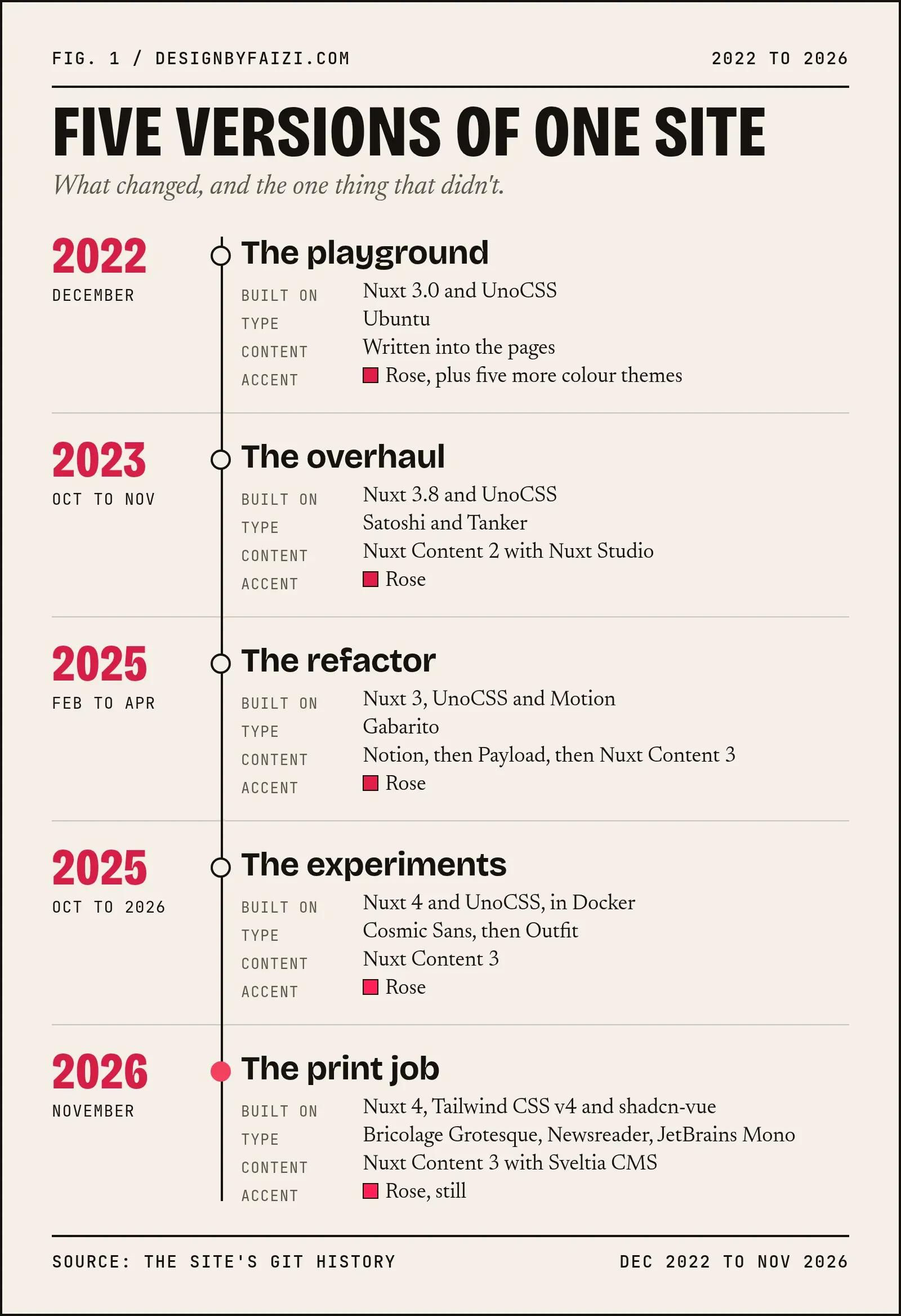
December 2022: the first commit
The repo starts on December 1st 2022, with a commit called
Initialized New Nuxt 3 Project.
Nuxt 3.0 had come out about two weeks ago, so I was just messing around with it.
That first version was a playground. It has six color themes (light, dark, sepia, cyan, green and purple) because why not 🗿. It had a glassy dropdown menu, an animated circle cursor that followed the mouse, and a bottom dock for navigation; similar to a Mac's doc. The styling was done using UnoCSS, which I loved so much that it will get its own post soon.
On detail survived everything that came later: the accent color. In the first ever color file, I had:
--primary: 225, 29, 72
which is rose. Four years and five versions later, the site is still rose.
Late 2023: content and a blog
In October 2023, I upgraded to Nuxt 3.8, added the Satoshi and Tanker typefaces, and set up Nuxt Content so I could write posts in Markdown. I also connected Nuxt Studio which is a visual editor for Nuxt Content. The first post was called "First Blog", and it said:
This was edited using Nuxt Studio's editor. It's an awesome piece of tech. I don't fully understand it but I love it.
It also ended with a code block containing console.log("Hello World"), so in a way this post has been coming for a while.
A month later I made another commit named
Major Design Overhaul
I added pages for projects, products and my stack, a contact page, a tooltip component, and a custom 404 page. Getting that error page to deploy took more commits than I can expected, and the messages tell the story better than I can:
Updated Error Page Again T_T
then
Updated Error Page Again ><
four times and finally
Created a custom middleware to handle 404. I'm done <>
(I removed the middleware a few commits later, the same day.)
By february 2024, I was honest enough to put a banner at the top that said
⚠️ This website is under construction
The animated cursor came out the same day.
2025: the content merry-go-round
In February 2025, I refactored the whole site with a fresh look. I added Gabarito typeface, shadcn-style color tokens, rounded buttons, and my first real animations with Motion. I also moved hosting from Vercel to Cloudflare Pages because I saw people on X/Twitter absolutely slandering my goat Vercel but they were lowkey right 😞.
Anyways the bigger change was where content lived, and I changed my mind three times in two months:
- Notion. Writing in Notion is lovely, and its API lets a site pull pages at build time. But I was fetching and reshaping someone else's data model for every section. Their sdk was also kinda annoying to work with. With AI it's probably not a big deal anymore but back in the day, I didn't like the tooling.
- Payload CMS. In March I replaced Notion with Payload which was a full headless CMS. It's excellent software, but for a personal site it meant running and maintaining a separate app with its own database. Very annoying.
- Nuxt Content 3. In April I moved everything back into the repository as Markdown and YAML files, with schemas. Skills, clients, blog posts, and later projects and art all became plain files.
That last move stuck because it removed a moving part instead of adding one. The art page arrived in April too.
Late 2025 to mid 2026: Nuxt 4 and font experiments
In mid 2025, I dropped Cloudflare, and by October I had upgraded to Nuxt 4 and written a Dockerfile so the site could run on my own server. The contact form spent a while writing to Google Sheets. Today it simply sends me an email. In 2026, I went through another typeface Outfit.
Looking back, this is the part I learned from the most. Each experiment looked fine on its own, but the site had no idea behind it. It was a collection of nice components without a reason to exist together.
November 2026: the rebuild 🔥
In November 2026, I saved a checkpoint of the old site and rebuilt it from scratch around one indea: a two-ink print job. The remainder of this post is about that version, the one you're reading.
How the blog works
The core of the blog is Nuxt Content. Posts are Markdown files in content/blog/, and Nuxt Content turns them into a small database at build time that pages can query.
1. A schema for every post
Every collection is declared in content.config.ts with a Zod schema. If a pose is missing a title or has corrupted date, the build fails instead of the page quietly breaking.
blog: defineCollection({
  type: "page",
  source: "blog/*.md",
  schema: z.object({
    title: z.string(),
    description: z.string(),
    featured_image: z.string().optional(),
    tags: z.array(z.string()).optional(),
    published: z.boolean().default(false),
    created_at: z.coerce.date(),
    updated_at: z.coerce.date().optional(),
    rawbody: z.string(),
  }),
}),
The rawbody field holds the raw Markdown, which I use to estimate reading time (words divided by 200). The published flag lets me keep drafts in the repository without putting them on the site, which is exactly what this post was until today.
2. Querying a post
The post page read its slug from the URL and asks the collection for one published post. If there isn't one, it throws a real 404.
const { data: post } = await useAsyncData(
  `post-${slug}`,
  () => queryCollection("blog").path(path).where("published", "=", true).first(),
  { getCachedData: fromPayload },
);
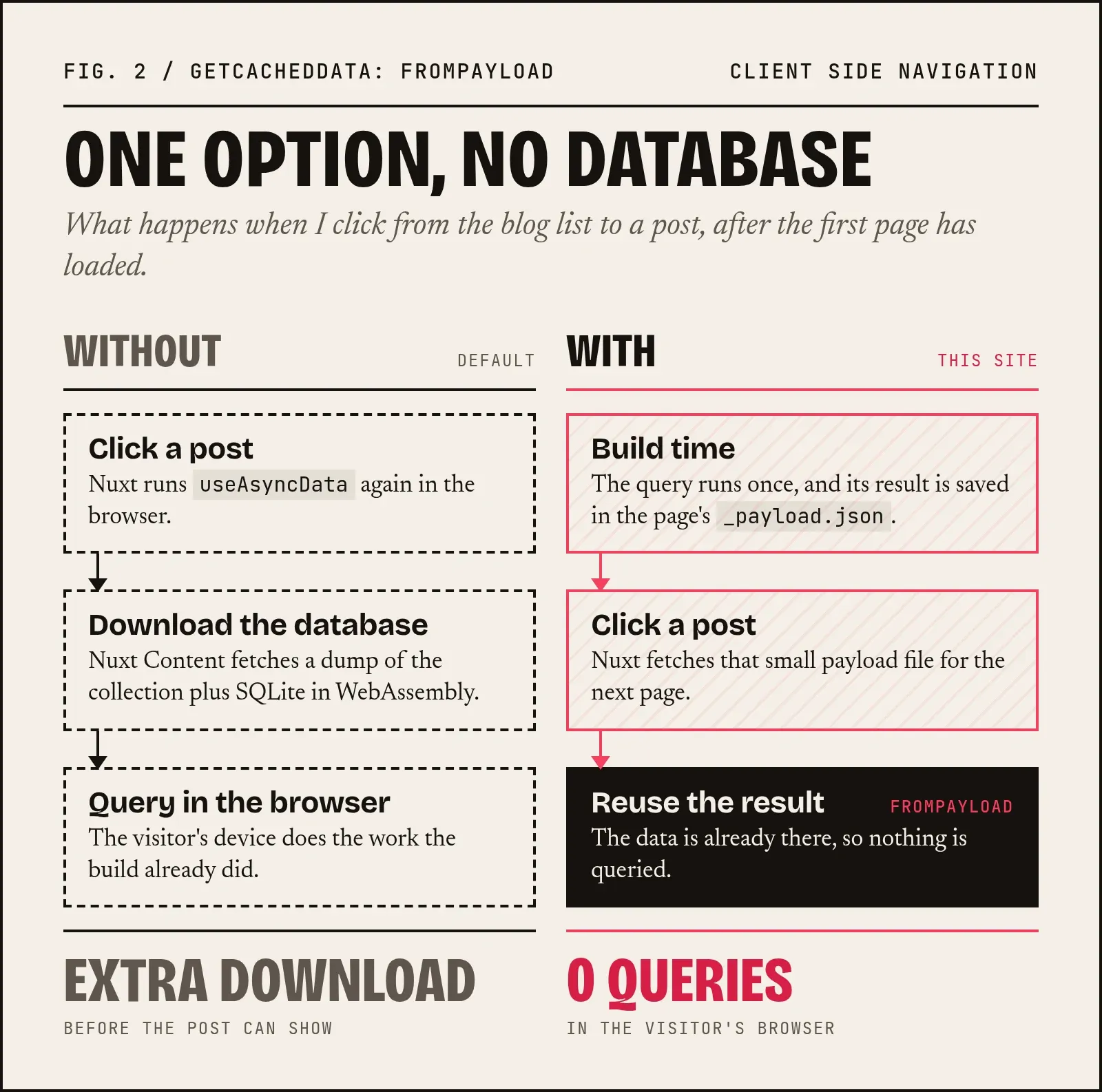
The getCachedData: fromPayload option is the small detail that matters most. Nuxt saves the query result inside each prerendered page, and this option tells it to use that saved copy. Without it, moving between pages in the browser would download the content database and query it on the client. With it, the browser never touches the database at all.
3. Prerendering everything
Every page is rendered to HTML when the site builds. Nitro (the server engine inside Nuxt similar to express) follows each link it finds and saves the result, so the blog index leads it to every post. The feed at /feed.xml and the sitemap are generated from the same collection. The only thing that runs on the server at request time is the contact form.
Nuxt Content also gives me headings with anchor links and the "On this page" table of contents next to this text. Code blocks are highlighted at build time with Shiki in a light and dark theme, so there so no Javascript highlightig the code blocks in the browser.
The CMS: Sveltia
Markdown files in a repository are great for me as a developer and terrible for writing on my phone. That's what Sveltia solves.
Sveltia is a Git-based CMS built as a modern replacement for Decap CMS (formerly Netlify CMS). There's no server involved and no database. The whole editor is a JavaScript file served from /admin, and is configured by one config.yml. When I log in with GitHub, it reads and writes the files in my repository directly through the GitHub API. Sweet right? ^^
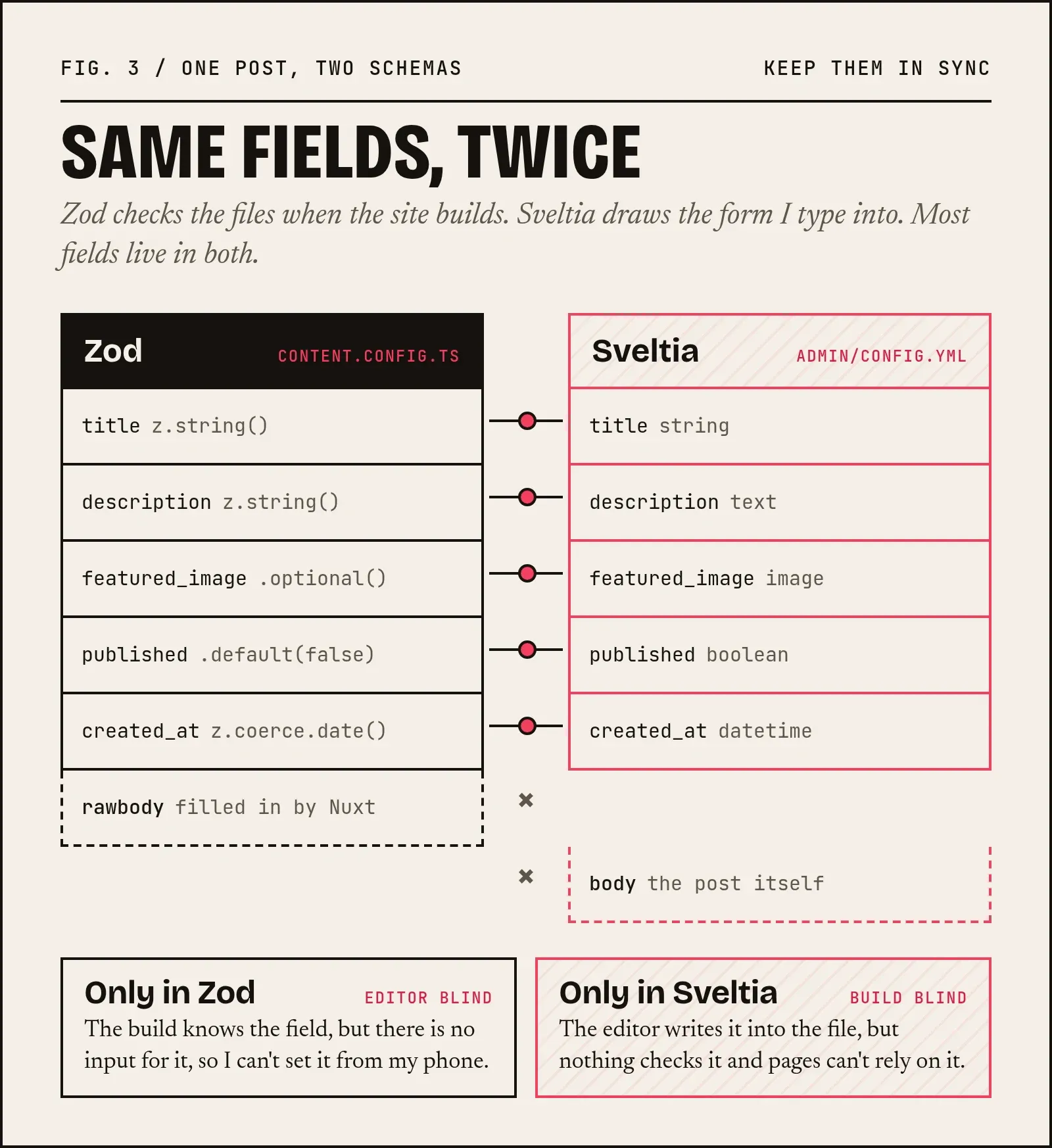
Each collection in the config mirrors a Zod schema from content.config.ts. Here is part of the one for blog posts:
- name: blog
  label: Blog posts
  folder: content/blog
  extension: md
  format: frontmatter
  create: true
  preview_path: blog/{{slug}}
  fields:
    - { name: title, label: Title, widget: string }
    - { name: description, label: Short summary, widget: text }
    - { name: featured_image, label: Cover picture, widget: image, required: false }
    - { name: published, label: Published, widget: boolean, default: true }
    - { name: created_at, label: Date, widget: datetime, format: YYYY-MM-DD }
    - { name: body, label: Post, widget: markdown }
The one rule I follow is that the two definitions must stay in sync: a field added to the Zod schema slso goes into config.yml, or the editor won't know it exists. Maybe in future I'll replace Sveltia with something that doesn't need a separate config and can use the same Zod schema as Nuxt Content but until then, I'll stick to Sveltia. I already adore its editor.
 Will commit to main for lollipops
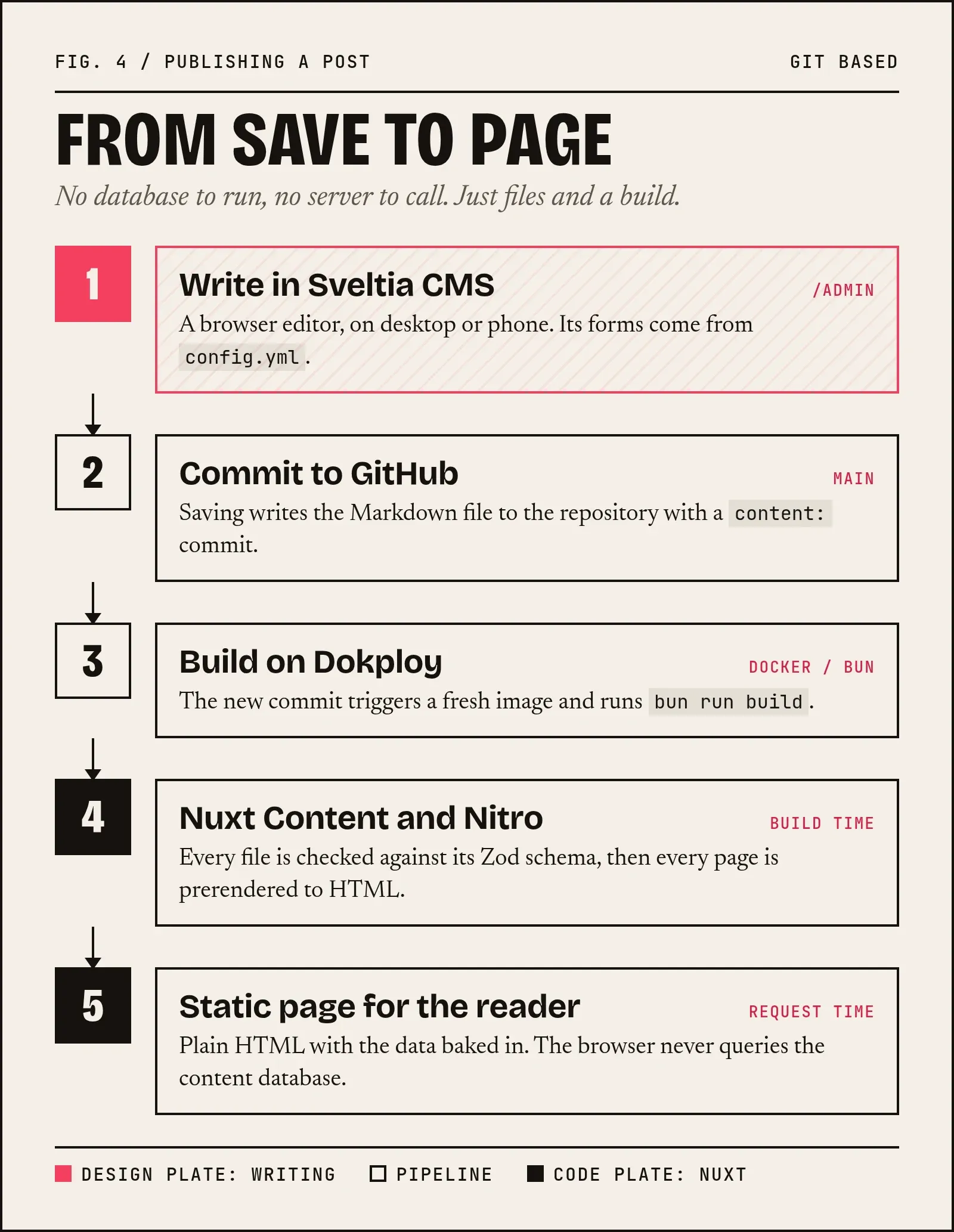
Publishing then looks like this:
- I write or edit in the CMS, in the browser or on my phone.
- Saving commits the Markdown file to the
mainbranch with acontent:message. - The commit triggers a redploy on Dokploy, which builds a fresh Docker image with Bun.
- During the build, Nuxt Content validates every file against its schema and Nitro prerenders every page.
- The new container replaces the old one, and the post is live a few minutes after I pressed save.
 Prerendered his lollipop at build time
My content history is my Git history. I can see who changed what (always me 🗿), roll back a bad edit with one command, and move the whole site anywhere a container runs. Compared with Notion and Payload, there's nothing extra to host, pay for or back up.
Designing it like a print job
The rebuild started with a question:
What would this site look like if it were printed?
Then I took the answer literally.
- Two inks on paper. The palette is rose, black and an off-white paper colour. The two themes are named Paper and Ink, and Ink (the dark one) is the default.
- Print vocabulary in the code. Components are called things like
OverprintText,HalftonePhoto,SpinStampandCropMarks. Sections are "sheets", small mono labels are "slugs". Having a vocabulary makes it surprisingly easy to decide whether a new idea works or not. - Halftone. The drawing in the intro sheet/section of the home page is printed in rose dots. Hover your mouse over it, or press and hold on a phone, and a lens develops the full picture underneath.
- Overprint and registration. Big headlines are set twice, once per ink and the rose plate slides into register as the page loads, the way a press lines up two colours.
- Square corners. The border radius is zero across the site because paper doesn't have rounded corners duh.
- Type. Bricolage Grotesque for display (horrible name btw but beautiful typeface), Newsreader for reading (this text) and JetBrains Mono for labels. There's also a line of Urdu, set in Noto Nastaliq, at the end of the home page.
All of this still follow some important rules like the animations respecting "reduce motion". The page works without JavaScript and the Lighthouse scores 100 for accessibility on almost every page.
What four years taught me
- A concept beats a component library: My older versions had good parts but without any reason or cohesion. One clear idea: Two Inks, did more for the design than any font change.
- Remove moving parts: Every content system I tried added a service. The one that stuck removed them all: files in my repository, with an editor on top.
- Ship, then fix: The "under construction" banner was up for a long time. That day of error-page commits taught me more about Nuxt's error handling than any docs page.
- Keep the history: Writing this post was only possible because every change is still in Git, including the embarrassing ones.
What's next
I want to write here about the things I actually run into: Nuxt and Vue patterns, CSS and design decisions, performance work, and the process behind my drawings. I intend to create a newsletter in the future so people who are interested in reading more of my silly journals can get a timely notification.
If you're hiring a frontend developer or a UI/UX designer, or you have a project in mind, I'd love to hear from you either on my socials or on the contact page. And if you just want to say hello back, that works too